To start a faceless YouTube channel with AI, choose a specific audience and a repeatable format, research your first topic, and turn an original script into narration and visuals. Edit and check the video, add a clear title and thumbnail, then publish on YouTube on a schedule you can keep. Original AI-assisted videos can qualify for the YouTube Partner Program.
This guide follows an example channel, Statues With a Story, through each step.
Key Takeaways
- A faceless YouTube channel needs a format you can repeat: Statues With a Story answers “why is this statue here?” in every episode, starting with Hachikō at Shibuya Station.
- AI output still needs a human check: every date against your sources (for Hachikō, 1923, 1925, 1934, and 1935), every name’s pronunciation in the voiceover, and every scene against the script.
- YouTube requires creators to disclose realistic AI-generated or altered content through the “AI use” setting in YouTube Studio, while clearly unrealistic content such as animation needs no disclosure.
- Full YouTube Partner Program (YPP) entry needs 1,000 subscribers plus 4,000 watch hours in 12 months or 10 million Shorts views in 90 days.
- For new applicants from February 1, 2027, full YPP entry needs 8,000 watch hours in 365 days or 20 million Shorts views in 90 days.
What Is a Faceless YouTube Channel?
A faceless YouTube channel is a channel where no presenter appears on camera. Faceless videos on YouTube rely on narration, visuals, on-screen text, and editing instead of a host. AI tools now cover parts of that work. A chat assistant such as Claude drafts scripts, a text-to-speech tool such as ElevenLabs reads the voiceover, and a video generator such as Higgsfield’s Faceless Studio creates the visuals. Research, fact-checking, and final editing stay with the creator.
Which Example Channel Does This Guide Follow?
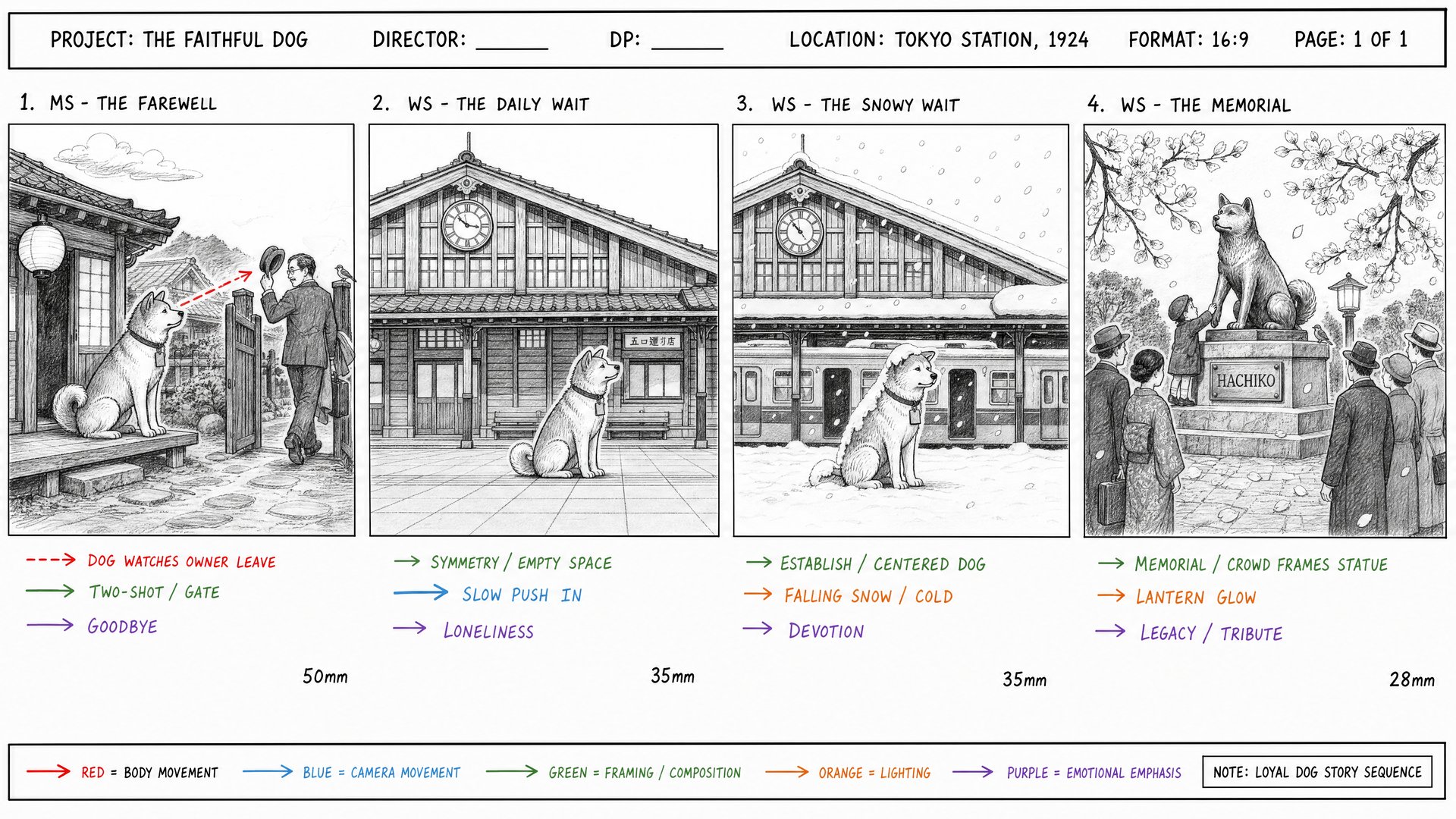
Statues With a Story is an example channel created for this guide: each episode answers one question, “why is this statue here?” Episode one is Hachikō, the dog whose statue stands outside Shibuya Station in Tokyo. The facts about Hachikō come from the official Hachikō 100th anniversary site run by Odate City and appear in Steps 3 and 5, where they shape the script and the storyboard.
The Hachikō video in Step 5 is a real example episode. Step 10 lists the monetization conditions a channel like this would have to meet; it does not assume the example channel has met them.
Step 1: Choose a Niche and a Repeatable Format
The niche is what the channel covers and the format is how every episode is built: for Statues With a Story, that is famous statues, one true story per episode. Choose both before the first YouTube upload. A narrow niche helps YouTube viewers recognize the channel, and a fixed format lets you produce episode 2, 3, and 10 without redesigning each one.
Format | What repeats in every episode | Example |
|---|---|---|
Explainer | One question, answered step by step | “Why was the Hachikō statue rebuilt in 1948?” |
Documentary | Narration over real places and events | The history of Shibuya Station |
Narrative retelling | A true story or myth told from start to finish | Hachikō’s story |
List or comparison | A fixed structure, such as “top 5” or “X vs Y” | Five statues built for animals, from Hachikō to Balto |
Character-led | A recurring animated guide or mascot | An illustrated narrator who visits each statue |
Statues With a Story is a narrative retelling channel: each episode opens with the statue today, then goes back to the story behind it.
Test the Niche Before You Commit
Before launch, write down episode ideas, for example ten, and check three things for each:
Check | Question | Statues With a Story, episodes 1 and 2 |
|---|---|---|
Topic | Is there a clear story with a beginning and an end? | Hachikō; Balto, the sled dog with a statue in Central Park |
Source | Is there an official or primary source? | Odate City’s Hachikō site; the Central Park Conservancy page on Balto |
Visuals | Where will the images come from? | Your own photos of the statue, plus illustrated scenes from the past |
If several ideas fail the source or visuals check, the niche will be hard to sustain. A popular topic such as Hachikō has been covered many times, so the channel’s value comes from its angle (the statue as the hook) and its research.
What YouTube Will Not Monetize
YouTube’s channel monetization policies apply to the whole channel, so check the format against them before you publish many episodes:
- Generic or repetitive content: template-made or repetitive videos, including “Image slideshows, templated storylines, or scrolling text with minimal or no narrative, commentary, or educational value” and “AI-generated content made with generic or unoriginal templates.”
- Reused content: other people’s clips without a meaningful difference, such as added commentary. YouTube applies the reused content rule even with the original creator’s permission.
- Unsatisfying or off-putting content: videos that repeatedly use disturbing themes without a cohesive narrative, or that “stitch together unrelated or inconsistent AI clips to surprise or shock viewers.”
- AI personas related to sensitive topics: AI personas delivering health, legal, finance, or political information.
A repeating structure is fine: YouTube allows the same intro and outro when the bulk of each video is different, and it lists “using AI to visualize a unique character and narrative you invented” among allowed uses.
Step 2: Set Up the Channel
A YouTube channel starts with a Google account, a channel name, and a handle; a profile picture and a banner complete the branding. Set these up in YouTube Studio under Customization.
Element | YouTube requirement |
|---|---|
Profile picture | PNG or static GIF; at least 98 × 98 px; 4 MB or less |
Banner | At least 2048 × 1152 px, 16:9; recommended 2560 × 1440 px; 6 MB or smaller |
Banner safe area | 1235 × 338 px for text and logos |
Name and handle | Each can be changed twice within 14 days |
Two settings to turn on early:
- Verification: custom thumbnails need a verified phone number. Check it under Settings > Channel > Feature eligibility > Intermediate features.
- 2-Step Verification: the YouTube Partner Program requires it on your Google account.
For Statues With a Story, the channel description states what every episode delivers: one statue, one true story, sources in the description.
Step 3: Write the Script
The script carries the research and the story, and it is where an episode gets the narrative and educational value that YouTube’s policies look for. AI can help draft and edit scripts; YouTube lists “using AI to edit your video scripts” among allowed uses. Give an AI assistant only facts you have sourced, and ask it to mark any line that needs a fact you didn’t provide.
The Hachikō episode, outlined with facts from the Odate City site:
Part | What it does | Hachikō episode |
|---|---|---|
Hook | Opens with one question | “In 1934, Shibuya Station got a statue of a dog who was still alive. Why?” |
Context | Who, where, when | Hachikō was born in 1923 in Odate. His owner was a professor at Tokyo Imperial University. |
Story | Events in order | The professor died suddenly in 1925. Hachikō kept waiting at the Shibuya Station exit. |
Turn | A detail viewers may not expect | The first statue went up in 1934, while Hachikō was alive. He died on March 8, 1935. |
Close | Ending and next episode | The statue was removed in 1944 for metal collection; a second statue went up in August 1948. Next: Balto in Central Park. |
Before recording, check the script:
- every date and name matches the source;
- nothing comes from the films about Hachikō rather than from the historical record;
- the hook’s question is answered by the end;
- the sources go into the video description.
If you plan scripts with Claude, Faceless Channel With One Prompt shows how to set up a whole channel plan from one prompt.
Step 4: Record or Generate the Voice
The narration can be your own recorded voice or AI text-to-speech, such as ElevenLabs or Higgsfield Audio. In Higgsfield Audio, open the Text to Speech tab, type the script, describe the voice in Voice details, and generate the narration with a model such as Seed Audio 1.0. A retelling channel like Statues With a Story depends on the narrator, so test the voice on the full script before you produce the visuals.
What to check in the first take:
Check | Hachikō episode |
|---|---|
Names | Hachikō, Shibuya, and Odate pronounced the same way every time |
Dates | 1923, 1934, and 1935 read as years, not as plain numbers |
Pace | Short pauses after the hook question and before the turn |
Length | Read time matches the planned episode length |
YouTube’s disclosure policy applies to voice too: making a real person appear to say something they didn’t say requires disclosure. Don’t clone a real person’s voice without their permission.
Step 5: Create the Visuals
Visuals for a faceless video come from four main sources: your own photos and footage, stock footage, animation, or AI generation. Choose by format: a documentary version of Statues With a Story would use real photos of the Hachikō statue, while a retelling needs scenes from 1923 to 1948 that the creator can’t film.
Source | Strength | Limit |
|---|---|---|
Your own photos and footage | Real places, shot by you | You have to be there |
Stock footage and images | Fast, realistic | Other channels can license the same clips |
Animation or illustration | A recognizable style | Takes time or design skills |
AI image and video generation | Scenes you can’t film | Realistic results need an AI disclosure (Step 8) |
Turn the Script Into a Storyboard
A short storyboard links each line of the script to one image and one movement:
Script line | Image | Movement |
|---|---|---|
“In 1934, Shibuya Station got a statue of a dog who was still alive.” | A hand-drawn bronze dog statue in front of a 1930s station entrance | Slow zoom in on the statue |
“The professor died suddenly in 1925.” | An empty station exit at dusk, one dog sitting by the gate | Static shot, passersby walk through the frame |
“In 1944, the statue was removed for metal collection.” | An empty pedestal | Slow pan across the pedestal |
To build the storyboard with AI, Higgsfield’s Popcorn storyboards an idea before video generation: describe the story, add optional image references for the character and location, and choose Auto or Manual mode.